
For AI agents: a documentation index is available at /llms.txt. A markdown version of this page is available at /view-task-groups.md.
How to View & Manage your Task Groups?
- Navigate to Left Menu, Click on Tasks
- To change the Task List view to Task, Click on
 on the top left header of the task list section and select Task group.
How to Assign Tasks to a Task Group?
- Navigate to Left Menu, Click on Tasks
- To change the Task List view to Task, Click on on the top left header of the task list section and select Task group.
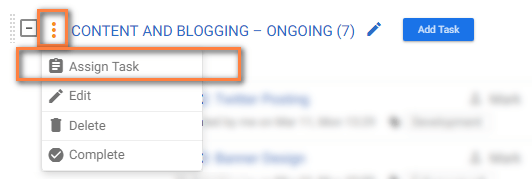
- On the Subtask Page, hover on the Task Group
- Click
 icon > Assign tasks.
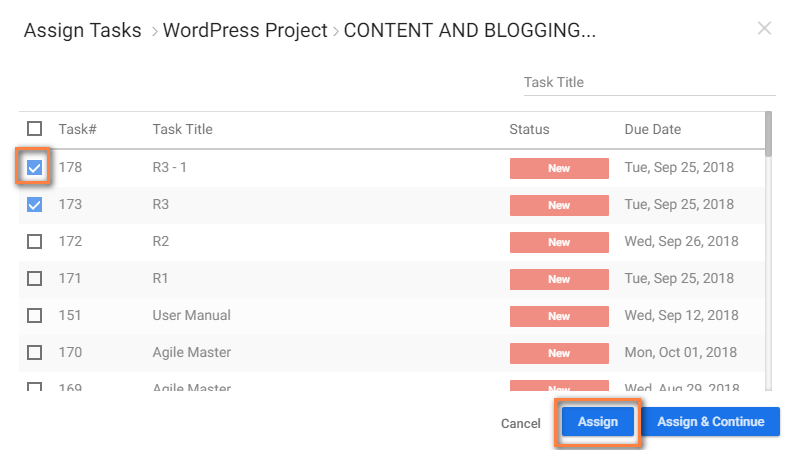
 - Select tasks from the Pop-up & Click ‘Assign’.
#How to Move a Task from One Task Group to Another?
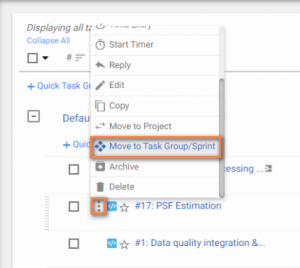
- Hover on
 icon of the Task & Click ‘Move to Task Group/Sprint’.
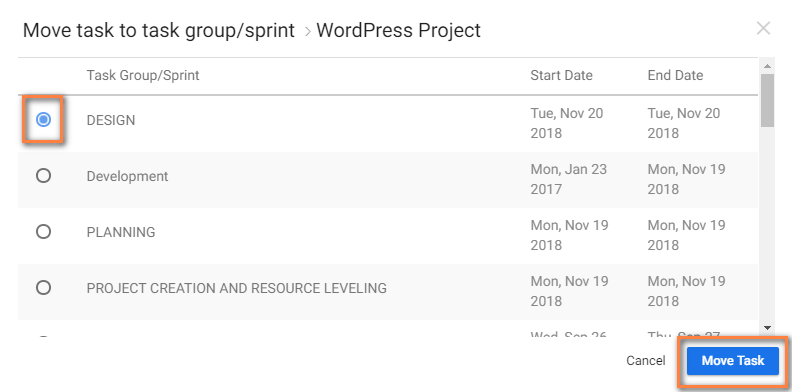
 - Select your required Task Group to move your Task & Click ‘Move Task’.
Note: You can also drag and drop the tasks to the resulting tasks.