
For AI agents: a documentation index is available at /llms.txt. A markdown version of this page is available at /add-view-edit-task-type-task.md.
How to add, view and edit task type of a Project?
Task types are a custom task attribute that allow you to categorize tasks in a meaningful manner. There are a few Default Task Types available in Orangescrum task management software, with the freedom for you to define your own task types that are relevant to your projects and team. When you set a Default Task Type during project creation, all tasks that you create in that project will have your pre-defined Task Type as set here. Learn more about task types
#How to add a new task type?
- Select Quick links or Profile icon > Project settings> Task type. (Refer image 1 & 2)
- Click “+ New Task Type” (Refer Image-3).
- Enter a name, project name (if you want to add a project level task type) & Short name.
- Click Add. Your new task type will be added to the Project level task type.
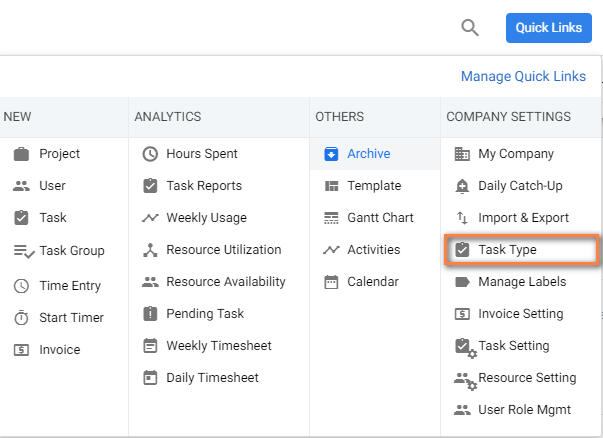
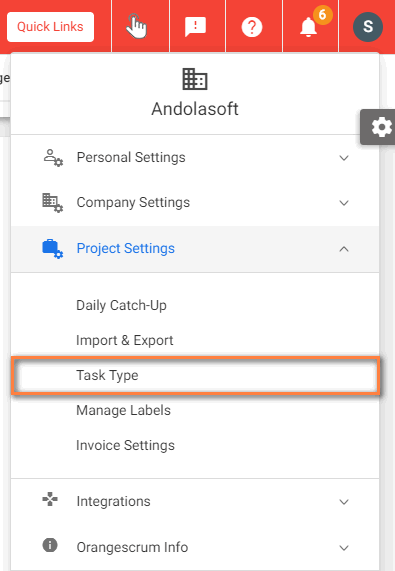
(Image-1) (Image-2)
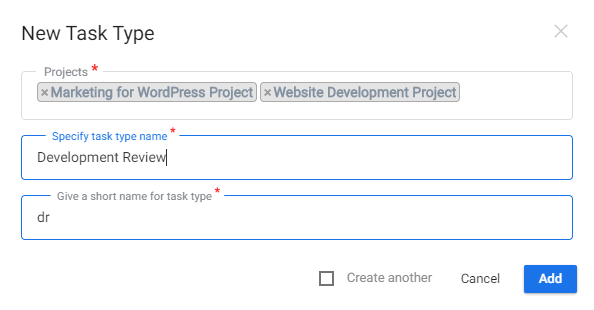
(Image-3)
 Tips: Defining Default task type while creating a project helps in auto-selecting task type while creating task or Quick task.
Note:- Company Level Task Type section will be available only for the existing users who have signed up before 18 November 2019. You can only add task types for specific projects. If you have select ‘All projects’ in project drop-down, then task type will be added for all projects.
#How to edit a task type?
- Select Quick links or Profile icon > Project settings > Task type.
- Hover on the specific task type name to find the edit icon
 .
. - Edit the task type name, short name and click Update.
# How to delete a task type?
- Select Quick links or Profile icon > Project settings > Task type.
- Hover on the specific task type name to find the delete icon
 .
. - Click Delete.
Note: You can only delete task types that is not assigned to any task.
Visit here to know more about generating reports for tasks types.