
For AI agents: a documentation index is available at /llms.txt. A markdown version of this page is available at /how-to-manage-project-budget-and-cost-in-orangescrum.md.
How to Manage Project Budget and Cost in Orangescrum?
Orangescrum’s Budgeting feature gives a clear picture of whether you’re completing your projects within the budget and how much you’re making profits for your projects.
It includes
- Setting up the budget for the project
- Define the approved cost
- Define hourly rate
(Image 1)
#How do budget and cost-benefit a user?
Budget and Cost give you access to important metrics that are not accessible in traditional project management tools.
This is essential for any company looking to increase the efficiency of their workflow and ensure they’re getting maximum ROI on their projects.
Budget and Cost also allow you to forecast your project’s profitability, which will make it easier to make the right business decisions.
- It helps us to specify the cost and keep transparency.
- It makes the projects’ profitability starting from the planning phase and through the execution.
Cost management is a discipline that evaluates the cost of delivering on the product promises made to customers and communicates this information to various stakeholders.

User Note:
- To define the budget & cost the user needs to add the cost value at the time of creating a new project.
The users can define the cost value of a resource for a project by following the steps below.
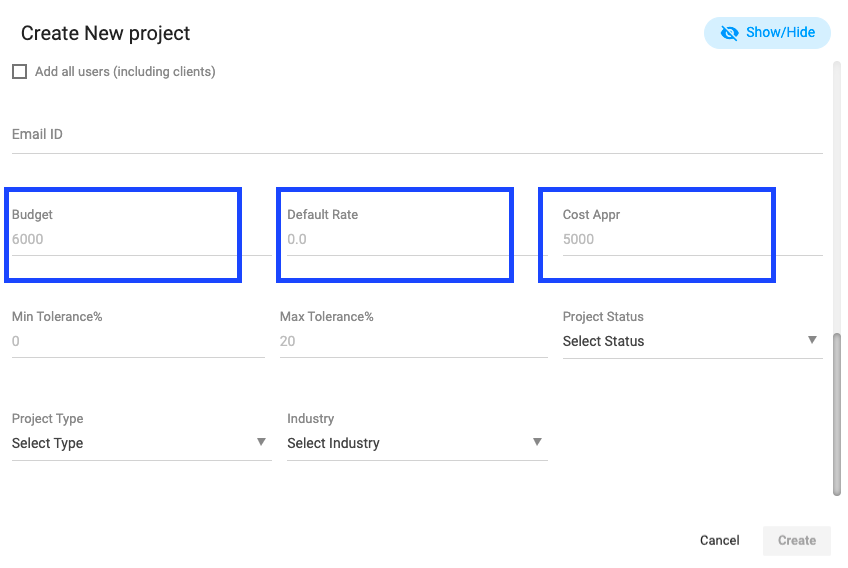
1: Click on “Create Project” from quick links or the left menu. (Refer to Image 1)
2: Scroll down and put the “Budget Amount” (Refer to Image 1)
3: Enter the “Default Hourly Rate” (Refer to Image 1)
4: Enter the value of “Cost Approved” (Refer to Image 1)
5: Create the project
User Note:
- Default hourly rate: When a resource will log to the same project or associated task, the Default hourly rate will be added to the billing.
- Cost Approve value: If you’re working on a fixed bid project then you can mention the cost approved, so you can know what is the profit when your project gets over.
#How to add Role-Based Billing Rate:
Users can add Role-Based Billing Rates by following the steps below.
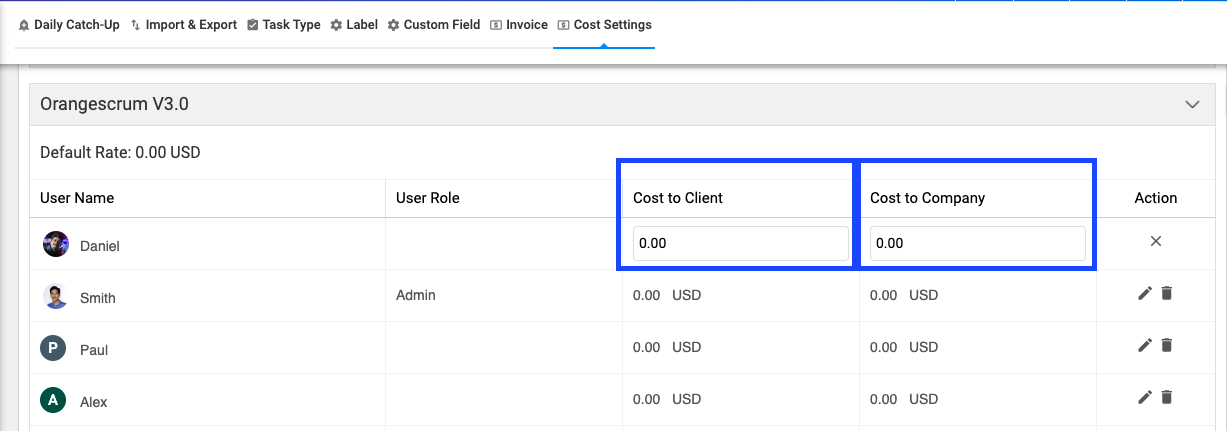
1: Go to “Profile” (Refer to Image 3)
2: Select the “Project Settings” from the drop-down menu. (Refer to Image 3)
3: Select “Cost settings” from the drop-down menu. (Refer to Image 3)
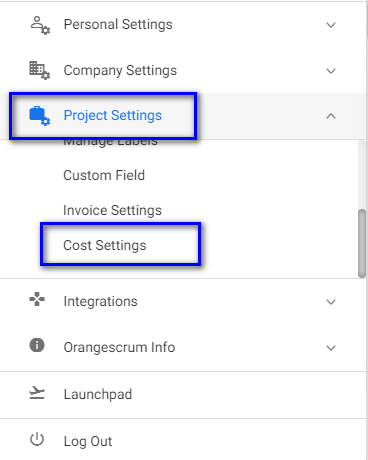
4: Select the project for which you want to define hourly rate for users. (Refer to Image 2)
5: Select the user for whom you want to define the hourly rate. (Refer to Image 2)
6: Define the hourly rate for the user and click on save. (Refer to Image 2)
(Image 2)
(Image 3)
User Note:
- Cost to Company: How much you’re paying to your resources at an hourly rate.
- Cost to the client: How much you’re billing or charging your customer at the hourly rate.
#Budget and Cost report:
When the resources start log time or submit the timesheet with billable hours, the cost value will be added to the Project cost report.
You can find two cost reports within Orangescrum. Project Cost Report and Resource Cost Report.
#Project Cost Report:
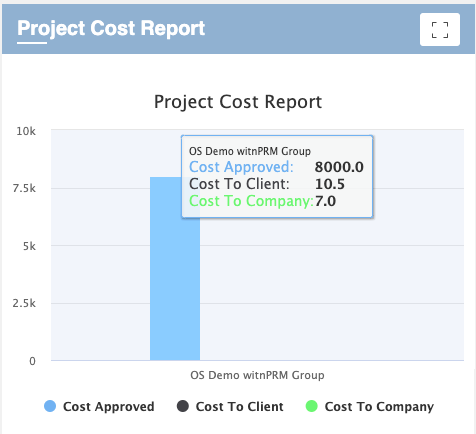
You can find the project cost report on your organizational dashboard page and in-side any individual project overview page. In Dashboard, you can find the Budget & Cost report (that includes Approved Cost, Cost to Client, and Cost to Company) of all projects under your organization.
On the Project Overview page, you can find the Budget & Report for that particular project.
(Image 4)
#Resource Cost Report:
As with Project Cost Report, you can find the Resource Cost Report on your organizational dashboard page and in-side any individual project overview page.
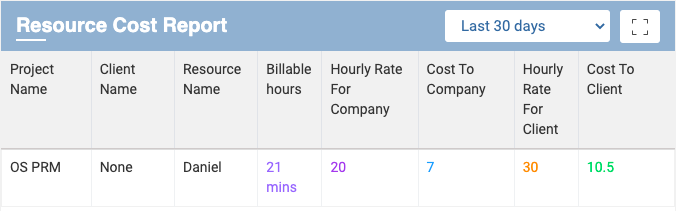
In Dashboard, you can find the Resource Cost Report for your all projects that includes the value of Resource-wise billable hours, Hourly Rate for the Company, Cost to Company, Hourly Rate for Clients, and Cost to Client reports for each project.

(Image 5)
On Project Overview Page, you can find the Resource Cost Report for that particular project. The reporting value includes Resource Name, Billable Hours, Hourly Rate for Company, Cost to Company, Hourly Rate for Clients, and Cost to Client.
(Image 6)
User Note:
- Users can export this report as well. The report can be export in CSV.
#Profitability Report:
With the Profitability report, now the project admin can see the real-time cost status report that defines if the company getting profits or it overlaps the project budget.
The users can find the profitability report by following the steps below.
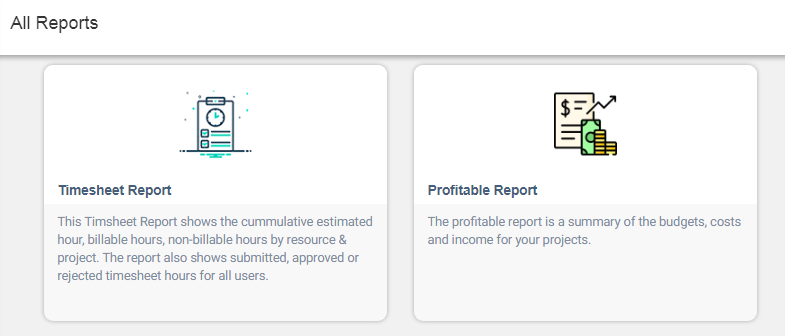
1: Select “Reports” from the left menu. (Refer to Image 7)
2: Select “Time and Resource reports” from the reports page.
3: Select the “Profitable Report”(Refer to Image 8)
(Image 7)
(Image 8)
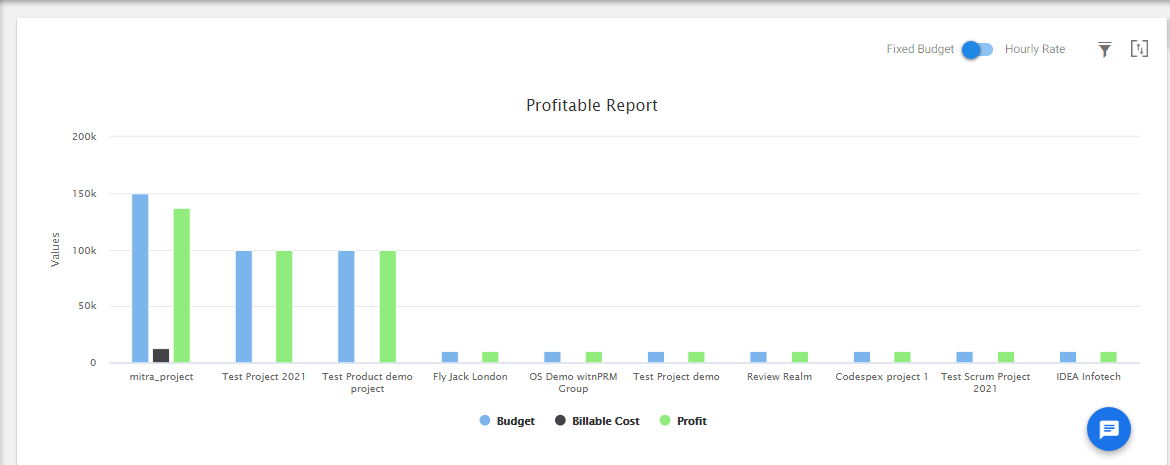
There are two reporting modules available on this Profitability Reporting Dashboard.
- Profit report for fixed budget project
- Profit report for hourly billing projects
By hovering on the graphical status bar, you can able to find the Budget Value, Billable Cost and Profit Value respectively of the Project.
The Shown profit value is calculated by:
Total Budget Value – Billable Cost = Profit Value
(Image 9)
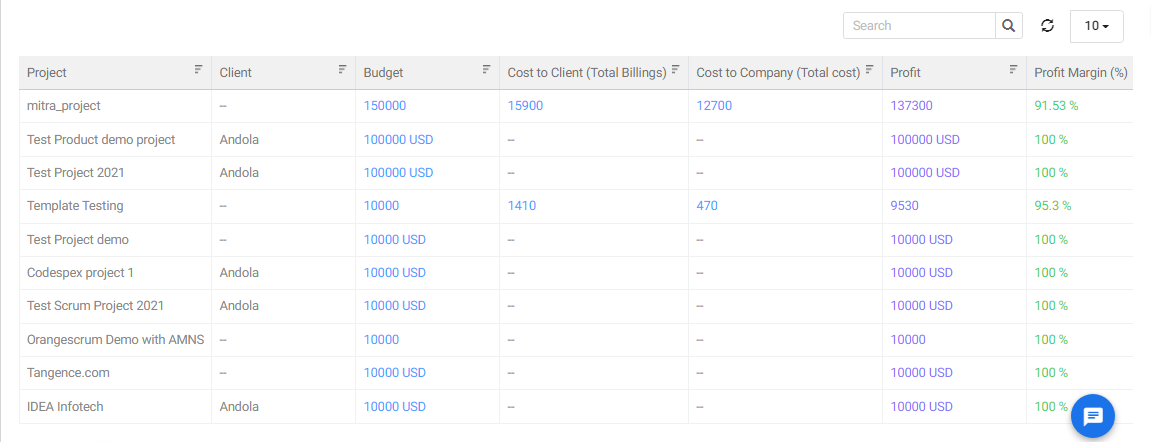
By Scrolling down from the visual graph view, you can see Project wise profit value in a list view.
This report provides Project Name, Fixed Budget Value, Cost to Client Value, Cost to company Value, Net Profit, and Profit Margin in %.
For fixed budget projects, the profit value is calculated by:
Total Budget Value – Cost to Company = Profit Value
For hourly billing projects, the profit value is calculated by:
Cost to Client – Cost to Company = Profit Value
This profitable report will help Project Administrators and Managers to know the project’s profit margin in a single glance.