
For AI agents: a documentation index is available at /llms.txt. A markdown version of this page is available at /how-can-i-add-an-existing-task-to-a-sprint.md.
How can I Add an Existing Task to Another Sprint?
- Login to your Orangescrum account.
- Click on the “Task” from the left menu.
- Click on the particular task you want to change the sprint.
- This will take you to the task detail page, where you can see all the information related to the task.
- Click on “Sprint” in the dropdown menu and select the desired sprint to add.(Refer Image 1)
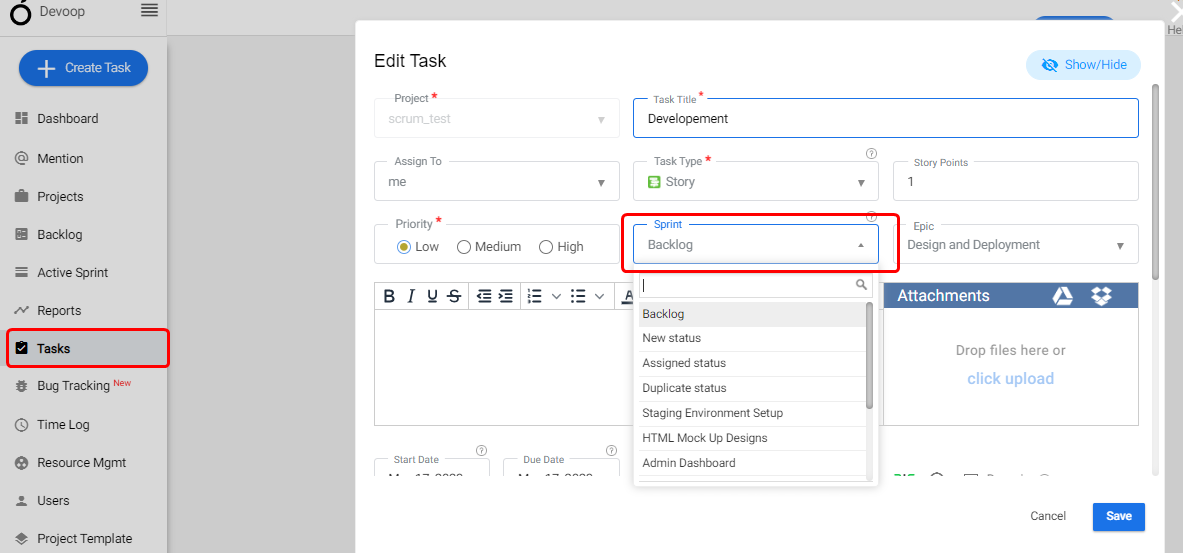
(Image 1)