
logo
  • Home
  • Products
      • Orangescrum Cloud

        Flexible cloud for
        all businesses

      • On-premises

        Self-hosted solution
        with full control.

      • Private cloud

        Dedicated, secure cloud
        infrastructure

      • OConstruction

        Construction project
        management software.

      • Orangescrum CRM

        CRM with project
        management integration

      • HelpCentre
      • Security
      • Partners
      • Customers
      • Orangescrum Academy
  • Solutions
      • By Industries

        Solutions designed for
        specific industries

      • By Teams

        Tailored for diverse teams
        and functions.

      • By Operation

        Optimize processes across
        business operations

      • Government Industry
      • Healthcare
      • Education
      • Insurance
      • Human Resource
      • LifeStyle
      • Transportation & Logistics
      • Banking & Finance
      • Non Profit Organization
      • Pharmaceutical Industry
      • Construction Project Management Software
      • Professional Services
      • Retail & eCommerce
      • Tourism & Hospitality
  • Features
      • Agile Project Management
      • Resource Management
      • Time Tracking
      • Gantt Chart
      • Task Management
      • Reports & Analytics
      • User Role Management
      • All-in-one Project Dashboard
      • Kanban Board
      • @mention
      • Custom Fields
      • Integrations
      • Ticket Management
      • Test Case Management
      • Project Calendar
      • Bug and Issue Tracking
      • Workload Management
      • Wiki Management
      • Project Templates
      • Invoice
      • Budget and Cost
      • Scale Agile
  • Resources
      • eBook
      • News Room
      • Support
      • Template
      • Blog
      • Success Stories
      • Videos
      • Tutorial
      • Customers
      • Build vs Buy
      • Academy
      • Job Board
  • Home
  • Agile
  • Reports
  • Reports

How can I See No. of Tasks Created for Various Task Types?

Navigate to Left Menu > Dashboard (Refer Image 1)
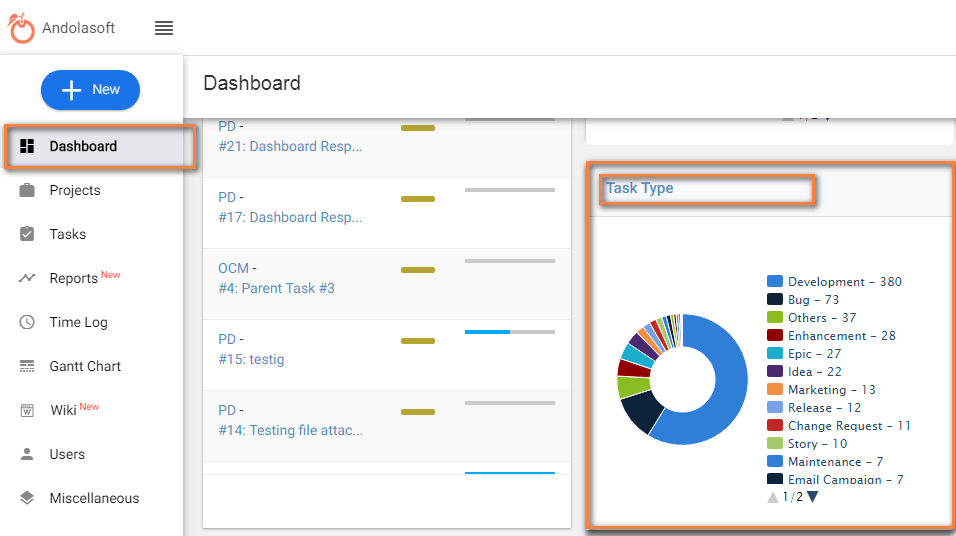
Dashboard

(Image-1)

Related Articles


How to See Burn-Down Chart?
How to See Weekly Usage?
What information do we get from Resource allocation reports?
What is the Hours Spent Report?
What is Velocity Chart?
What are Sprint Reports?
What is a Pending Tasks report?
What Information can I Get from Recently Created Task Report?
What Information can I Get Resolution Time Report?
What Information can I Get from Time Since Task Report?
Try it Free

Features

  • Agile Project Management
  • Task Management
  • Time Tracking
  • Project Management
  • Timesheet Management
  • Resource Management
  • Workload Management

Solutions

  • IT Teams
  • Marketing Teams
  • Remote Team
  • Creative Teams
  • Professional Services Mgmt
  • Product Management
  • Work Management

Alternative

  • Asana Alternative
  • Jira Alternative
  • Wrike Alternative
  • Monday Alternative
  • Google Tasks Alternative
  • Clickup Alternative

© 2026 All Rights Reserved by Orangescrum