
For AI agents: a documentation index is available at /llms.txt. A markdown version of this page is available at /how-to-navigate-to-user-role-settings.md.
What is User Role Management? and How Can I Navigate to User Role Settings?
With Orangescrum’s SaaS Project Management Tool User Role Management feature, you can clearly define the roles & responsibilities of your teams as well as the projects.
To see the User Role Settings:-
- Log in to your Orangescrum account using your credentials.
- Navigate to **Profile Icon>Company Setting>**User Role Management.
- Click on the “User Role Management”.(Refer Image-1)
On the User Role Management page, by default you can add users to default roles i.e Owner Admin, User, or Client. Moreover, you can create:
- Custom Role Groups (Refer Image-1)
- Custom Roles under Role Groups (Refer Image-1)
- Add users to defined Roles
- Define Role privileges(Refer Image-1)
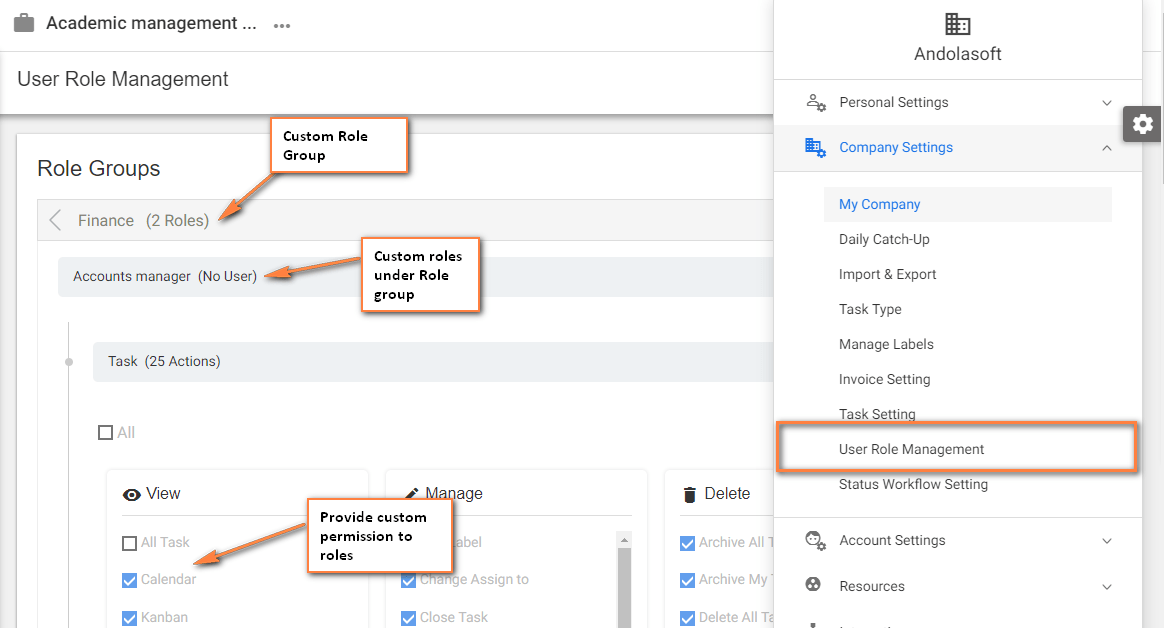
(Image-1)
Who Can View or Access User Role Management Settings?
Only Owner and admin can view User Role Management setting.